Parent-Child Modules (inline_items)
A form where a parent record (an Order) is created/edited together with a list of child rows (its Order Items) in the same UI, in one submit — not two separate modules a user navigates between. See Related-record tabs for the other, different, related-modules mechanism this engine has.
Reference fixture:orders-suite — Orders/OrderItems — the canonical, fully-verified example.
inline_items also has a row on the main Module Config reference page's top-level table, which links back here — it's entirely hand-authored, nothing about it is introspected, so the full field-shape reference lives on this page.
Building it
Follow the generate → hand-edit → regenerate loop:
- Generate the child module first — this order is required, not just convenient: the parent's
inline_itemsconfig (step 3) references the child's already-registered namespace, so the child module must exist before the parent's config can resolve it. It's an ordinary module generation on its own otherwise:bashSee the pitfall below — this exact ordering has one known side effect worth knowing about before you hit it.php artisan make:module Custom/OrderItems - Generate the parent module:bash
php artisan make:module Custom/Orders - Hand-edit the parent's
module.json, adding aninline_itemsentry:json"inline_items": [{ "key": "order_items", "label": "Order Items", "child_module": "OrderItems", "child_group": "Custom", "child_has_creator_updater": true, "parent_fk": "order_id", "primary_field": "product_name", "fields": [ {"key": "product_name", "label": "Product", "type": "text", "required": true}, {"key": "quantity", "label": "Qty", "type": "number", "required": true}, {"key": "unit_price", "label": "Unit Price", "type": "number", "required": true, "decimals": 4} ], "inject_from_parent": [ {"child_field": "currency", "parent_field": "currency"} ] }]inline_itemsis a flat list — not a map keyed by a group/label name.child_has_creator_updater: trueis required if — as is the project's default convention — the child table hascreated_by_id/updated_by_idcolumns; omitting it when the child needs it fatal-errors on the first real create (found and fixed while building this fixture — see Gotchas).inject_from_parentis optional — it copies a value straight from the parent model onto every child row at save time (here, the currency the order was placed in). If the child module itself lives under a nested sub-group (e.g.Modules\System\Inventory\StockTransferItems, not a bare top-levelModules\Custom\{Child}), also setchild_group_name(StudlyCase or plain,Str::studly()-normalized) to that sub-group — e.g."child_group_name": "Inventory". Omitting it when the child needs it generates a namespace reference missing that segment, which fatal-errors the same way a missingchild_has_creator_updaterdoes. - Regenerate the parent with
--forceto pick up the hand-edited config:bashphp artisan make:module Custom/Orders --force
What you get
The Orders create form gets an "Order Items" section embedded below its own fields, starting empty:
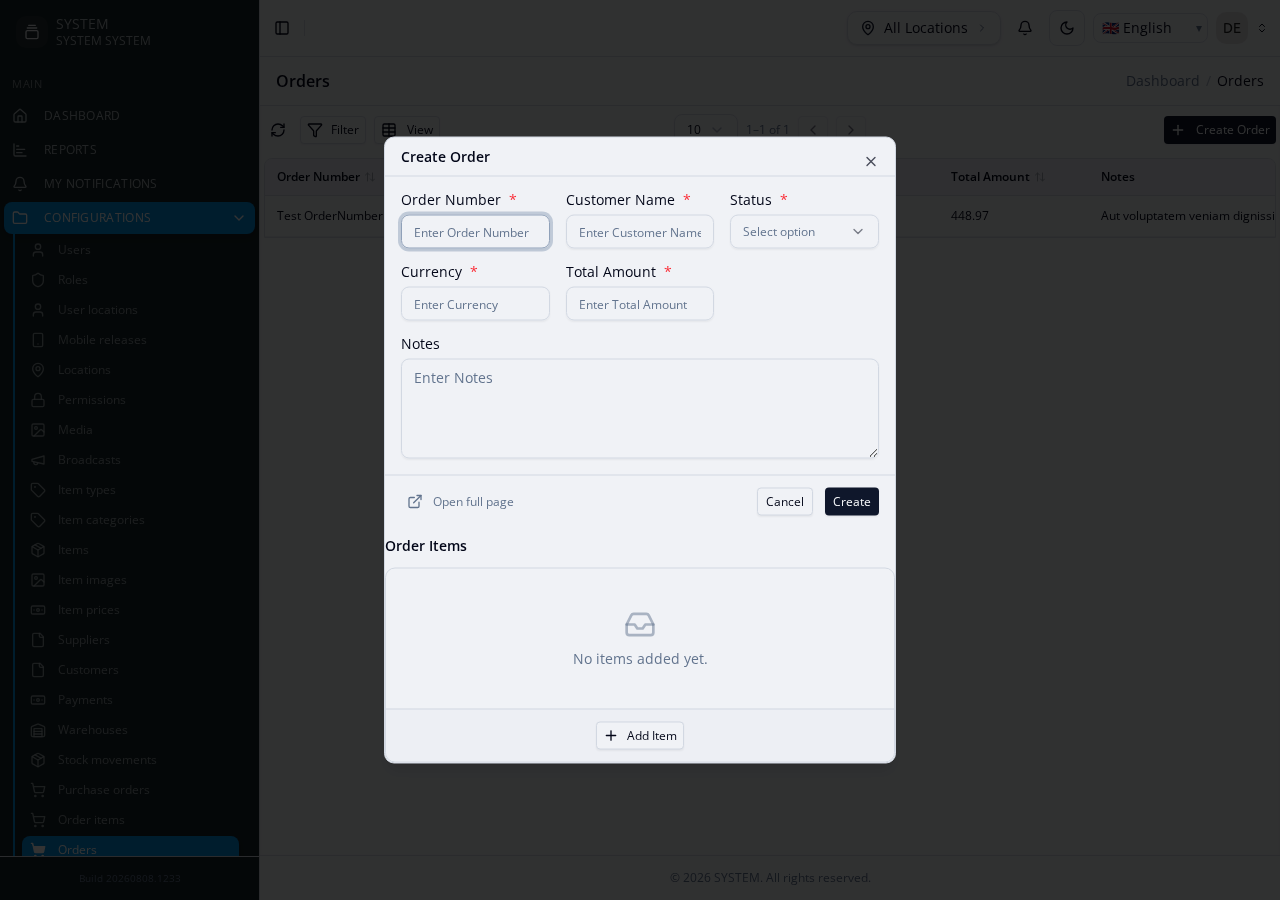
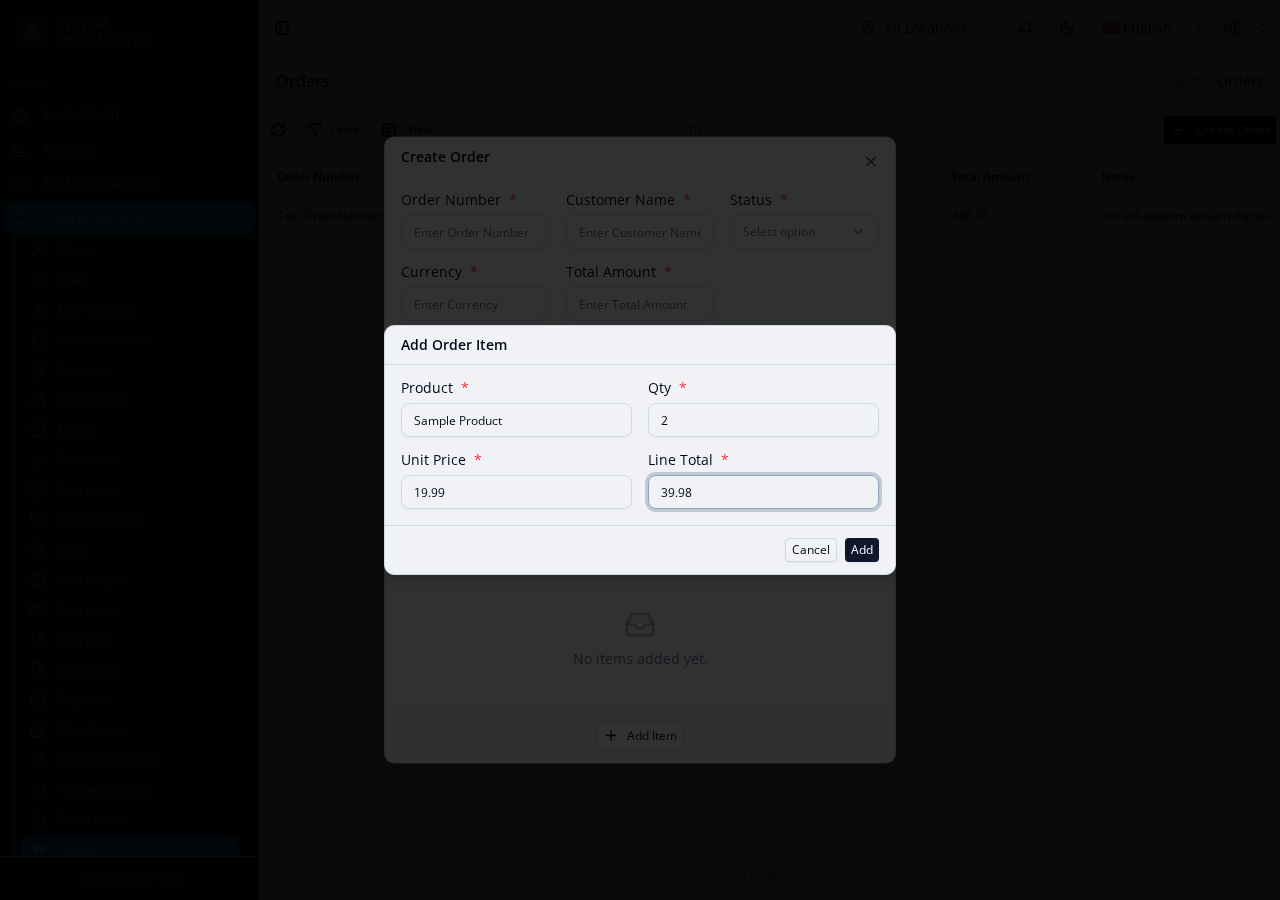
Clicking "Add Item" opens a modal for one child row — filled in and submitted without ever leaving the parent Order's own create/edit form:
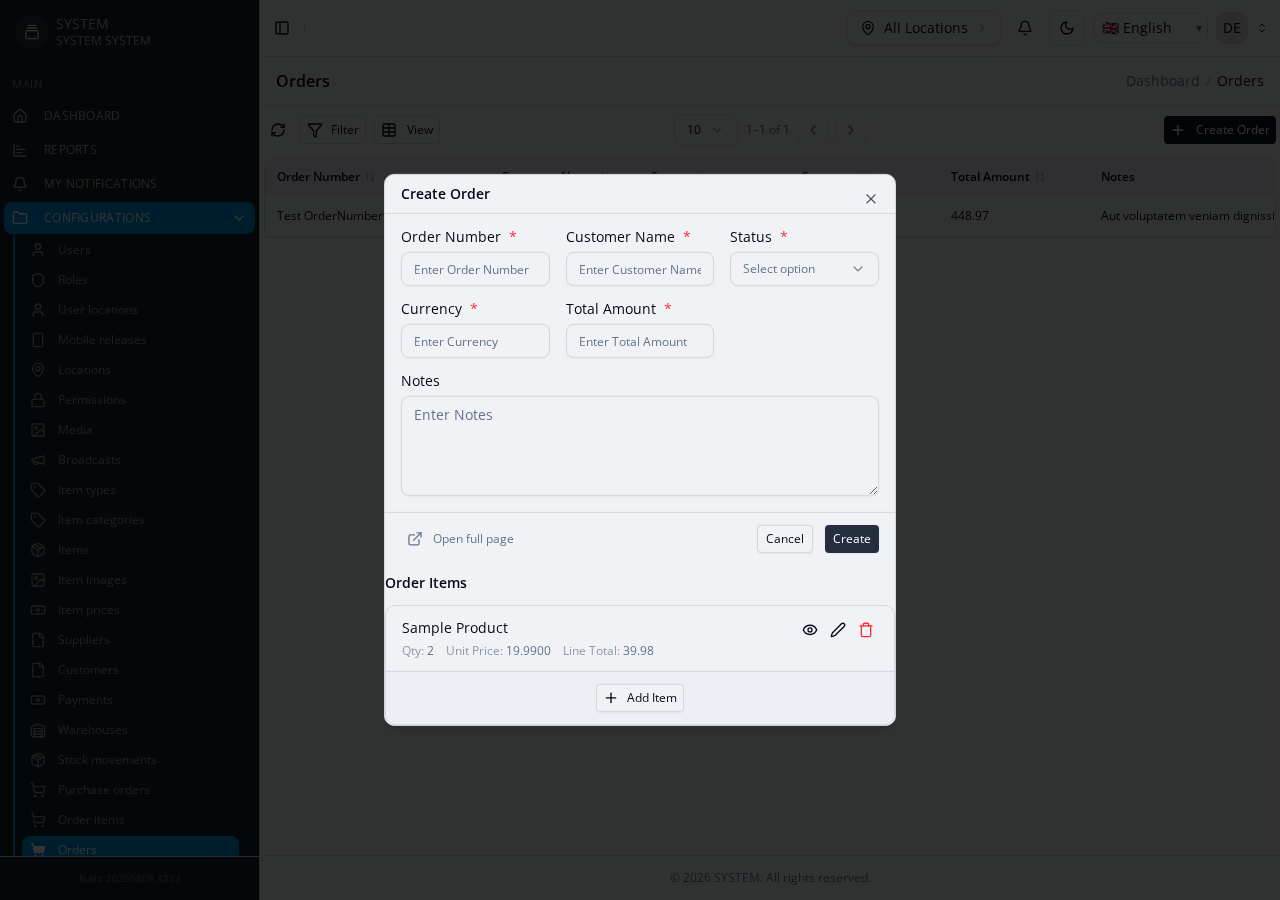
...and the row lands right back in the parent form, ready for the next one or for the whole Order (parent + every child row) to be submitted together, in one request:
- The Orders create/edit form gets an embedded, hand-edit-protected wrapper component (
OrdersOrderItemsInlineItems.vue) rendering the child rows inline as real, concrete markup — the rows, plus Add/Edit/View/Delete dialogs, generated from yourfields[]config. It is written once and never touched by future regeneration, so you edit it like any other Vue component (per-field conditions, cross-field totals) without a later--forceclobbering it. - The Orders Details/Overview page gets a matching read-only
OrdersOrderItemsLineItemsView.vue(v3.5.22+): a table with one column per field not hidden byshow_in_table: false, headed by its label, each value resolved by widget type (a select shows its option label or its related record's name, a checkbox Yes/No, a number itsdecimals), and a footer row of column sums for anytotalsentry. Also written once. OrdersCreateServicesaves every child row on create.OrdersEditServicesyncs on edit: rows removed from the form are deleted, rows matched byuuidare updated in place, new rows (nouuidyet) are inserted.OrdersViewServiceloadsorder_itemsalongside the parent record.OrdersDeleteServicecascade-deletes everyorder_itemsrow when the parent Order is deleted (respecting the child's own soft/hard delete mode automatically) — an inline_items child has no independent lifecycle by design, so cascading on parent delete is the same ownership rule applied once more.OrdersDeleteCheckService's dependent-count check already flagsorder_itemsas a blocking dependent too — for free, via the same generic FK-graph naming-convention detection that covers any*_idcolumn, entirely independent of theinline_itemsconfig above.
Table variant, running totals, and other component config
Everything below is set directly on an inline_items[] entry, alongside key/label/fields — no other generation step, no hand-editing the wrapper required:
"inline_items": [{
  "key": "order_items",
  "label": "Order Items",
  "child_module": "OrderItems",
  "child_group": "Custom",
  "parent_fk": "order_id",
  "primary_field": "product_name",
  "variant": "table",
  "totals": [
    {"field": "line_total", "label": "Total", "sync_to": "total_amount"}
  ],
  "empty_message": "No items added yet.",
  "view_modal_title": "Item Detail",
  "delete_message": "Remove this line item?",
  "can_delete": false,
  "fields": [ /* ... */ ]
}]
variant: "table"renders the child rows as real aligned columns (Qty/Unit Price/Amount, numeric columns right-aligned) instead of the default compact card row — the shape financial line items actually want. Omit it (or"card") for the original row layout.totals[]adds one footer row per entry, summing that field across every child row —variant: "table"puts the sum under the matching column,"card"shows it as a right-aligned summary line. Multiple simultaneous totals are supported (e.g. summing bothquantityandline_total).sync_to(generator-only — never reaches the runtime component) names a top-level parent form field that should always equal the sum: the generated form wires an@totals-changehandler that writes the running total into that field and auto-disables it, so it's never hand-entered and never drifts out of sync with the line items. The summed field itself is just a normal field on each child row (quantity * unit_price-shaped totals need a real per-row field carrying that product — nothing here multiplies two fields together automatically).empty_message,view_modal_title,delete_messageoverride the component's own default copy for those three states.can_add/can_edit/can_view/can_delete(all defaulttrue) turn off that action entirely — e.g. a line-item type that should never be deletable once added. Only emitted into the generated form when explicitlyfalse; leaving them unset costs nothing.
Per-field options
Each entry in fields[] supports more than key/label/type/required:
{"key": "notes", "label": "Notes", "type": "text", "input_type": "email",
 "readonly": true, "disabled": true, "default": "N/A",
"table_width": "200px", "show_in_table": false, "col_span": 2}{"key": "priority", "label": "Priority", "type": "text", "field_type": "select",
"options": [{"id": 1, "name": "Low"}, {"id": 2, "name": "High"}],
"option_label": "name", "option_value": "id"}| Key | Effect |
|---|---|
readonly / disabled | Field renders but can't be edited / is fully inert |
default | Pre-filled value for a new row |
input_type | 'text' field's underlying <input type> (email, tel, number, ...) |
table_width | Fixed column width in variant: "table" |
show_in_table | Set false to keep a field editable in the Add/Edit modal but hide it from the row/table display |
col_span | 1 or 2 — how many columns this field spans in a modal_columns: 2 layout |
options | A local (non-API) fixed dropdown list — {id, name} pairs. Mutually exclusive with splash_key/api_url, which drive an API-backed picker instead |
splash_key | Renders this field as a self-fetching ApiSelect2Field (FK picker) hitting GET /select/{PascalCase(splash_key)}. This resolution is unconditional, applied when the wrapper is generated (v3.5.22+; the retired shared inline-items component used to resolve it at runtime, and v3.5.18–v3.5.21 briefly dropped it) — a select with a splash_key and/or api_url and no literal options becomes an API-backed picker on api_url if given, else /select/{PascalCase(splash_key)} — unlike a Create/Edit form field's own splash_key, it does not depend on features.backend.createSplash/editSplash at all. Because it hits a generic /select/{module} route, that route's own implementation (project-specific, not part of this package) typically needs the target module to expose some identifying-column convention — check your consuming project's docs for what that route requires. |
api_url | Explicit endpoint override — skips the /select/{splash_key} derivation and calls this URL directly. |
option_label / option_value | Which keys on each option/related-record object are the display label and the stored value (default name/id) |
option_subtitle_field | A secondary field shown under the label in an API-backed picker's row |
This field's
select+splash_keyresolution is the reference behavior.actions[].fieldsand plain Create/Editfields[]both went through a real bug (fixed v3.4.6/v3.4.7 — see Gotchas) where the sameselect+splash_keycombination either crashed or silently 404'd, because those two paths resolve conditionally throughcreateSplash/editSplashconfig.inline_itemsfields never had either problem, precisely because this resolution has always been unconditional.
Known limitation — the child's own FK relation can misresolve its namespace
Because the child (OrderItems) is scaffolded in step 1 while the parent (Orders) doesn't exist anywhere yet, OrderItemsModel's own generated order(): BelongsTo relation has nothing to resolve Orders' real namespace/module-type against, and silently guesses wrong (e.g. guesses Core\Orders\OrdersModel when Orders is actually Custom-grouped) — a different bug from anything else on this page, in the ordinary FK-relation namespace resolver (PathManager::resolveBackendModuleNamespace()), not the inline_items-specific namespace handling. Found live 2026-08-08.
There is no way to resolve this correctly at the moment OrderItems is generated — Orders genuinely doesn't exist yet. Fix: regenerate the child once more, after the parent has been scaffolded:
php artisan make:module Custom/OrderItems --forceA misresolved namespace does print a warning at generation time (routed through PathManager::reportIssue() → the console's $this->warn() output) — watch for a "not found in project or shell registry" message after step 1 as the signal you'll need this extra regenerate.
See the fixture's own README for the full verification steps this was actually tested against, including confirming a --force regenerate preserves both inline_items itself and a hand-edited wrapper component.